Property graphs, as introduced in the recent edition of the ISO SQL/PGQ and GQL standards, provide a convenient abstraction for representing entities and their relationships, and for expressing navigational queries over these relationships.
Labeled property graphs (LPG) have emerged as a prominent form of knowledge representations in graph databases, seeing extensive use in a wide variety of contexts, ranging from social network analysis to fraud detection. LPG is a graph data structure that extends the basic graph model by allowing nodes (vertices) and edges (relationships) to be labeled and annotated with properties. In this model, nodes and edges can each have one or more labels, which provide a way to categorize them, and properties, which are key-value pairs that store additional data.
Property Graphs and GQL are finally coming to Google BigQuery.
In this blog post we will look at how to build Property Graphs in BigQuery and then query them using GQL. We will use our example of Social Streaming platform:
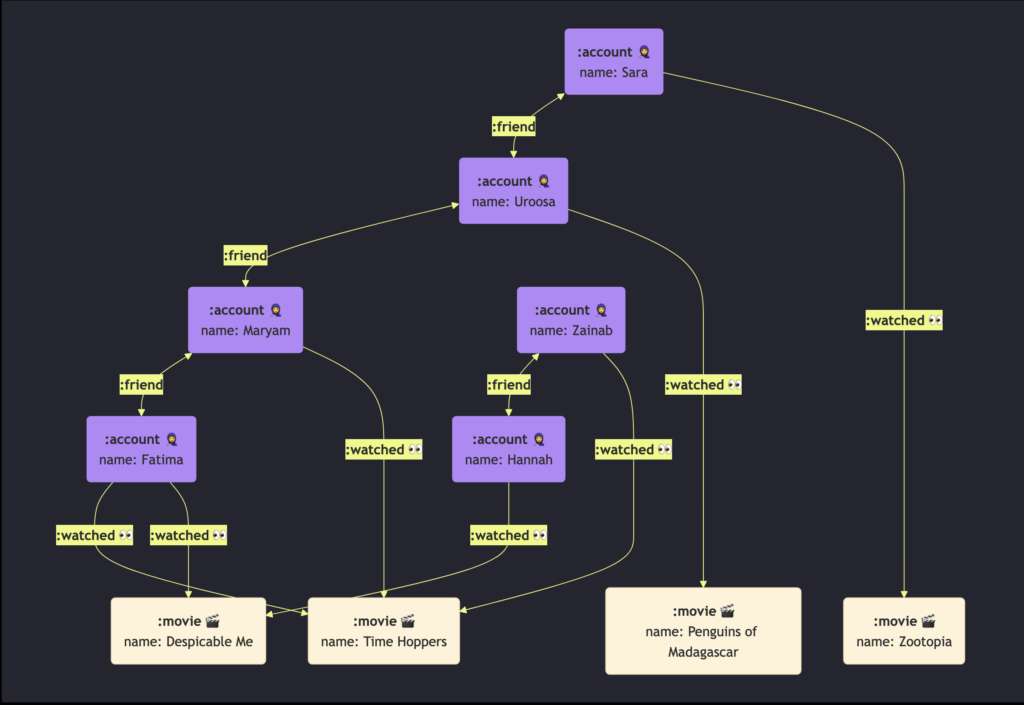
We are interested in the recommending movies based on the person’s 1st and 2nd degree connection. Let’s start by creating some sample data:
BigQuery Graph creates graphs from input BigQuery Tables. We will use the following tables to create the Social Streaming platform.
CREATE OR REPLACE TABLE graph_db.account (
 account_name                STRING  NOT NULL,
 PRIMARY KEY (account_name) NOT ENFORCED
);

CREATE OR REPLACE TABLE graph_db.movie (
 movie_name                STRING NOT NULL,
 PRIMARY KEY (movie_name) NOT ENFORCED
);


CREATE OR REPLACE TABLE graph_db.watched (
 account_name                STRING NOT NULL,
 movie_name                  STRING NOT NULL,
 PRIMARY KEY (account_name, movie_name) NOT ENFORCED
);


CREATE OR REPLACE TABLE graph_db.friend (
 account_name_1                STRING NOT NULL,
 account_name_2                  STRING NOT NULL,
 PRIMARY KEY (account_name_1, account_name_2) NOT ENFORCED
);Now we will insert some graph data into above tables. You can use your familiar SQL INSERT statements to insert data into the input tables.
insert into graph_db.account values ('Uroosa'), ('Sara'), ('Maryam'), ('Fatima'), ('Zainab'), ('Hannah');

insert into graph_db.movie values ('Penguins of Madagascar'), ('Zootopia'), ('Time Hoppers'), ('Despicable Me');

insert into graph_db.watched values
  ('Uroosa', 'Penguins of Madagascar')
  , ('Sara', 'Zootopia')
  , ('Maryam', 'Time Hoppers')
  , ('Fatima', 'Time Hoppers')
  , ('Zainab', 'Time Hoppers')
  , ('Fatima', 'Despicable Me')
  , ('Hannah', 'Despicable Me');

insert into graph_db.friend values
  ('Sara', 'Uroosa')
  , ('Uroosa', 'Maryam')
  , ('Maryam', 'Fatima')
, ('Zainab', 'Hannah');BigQuery Graph supports the property graph data model with nodes and edges annotated with labels and properties.
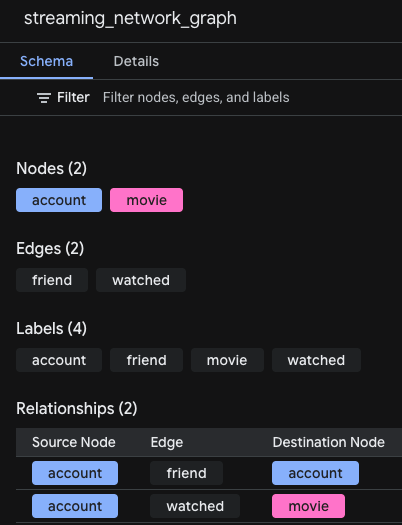
In this Social Streaming graph schema, we will create 2 types of nodes and 2 types of edges based on the relational input tables defined previously:
We define 2 types of nodes based on 2 input tables:
- Account node, based on Account table
- Movie node, based on Movie table
Edges
We define 2 types of edges (relationships) between nodes:
- Watched edge, based on Watched table, connecting Account node to Movie node.
- Friend edge, based on Friend table, connecting Account node to another Account node.
CREATE or replace PROPERTY GRAPH graph_db.streaming_network_graph
 NODE TABLES (
   graph_db.account
     KEY (account_name)
     LABEL account
     PROPERTIES (account_name),
   graph_db.movie
     KEY (movie_name)
     LABEL movie
     PROPERTIES (movie_name),
 )
 EDGE TABLES(
   graph_db.watched
     KEY (account_name, movie_name)
     SOURCE KEY (account_name) REFERENCES account (account_name)
     DESTINATION KEY (movie_name) REFERENCES movie (movie_name)
     LABEL watched
     PROPERTIES (account_name, movie_name),
   graph_db.friend
     KEY (account_name_1, account_name_2)
     SOURCE KEY (account_name_1) REFERENCES account (account_name)
     DESTINATION KEY (account_name_2) REFERENCES account (account_name)
     LABEL friend
     PROPERTIES (account_name_1, account_name_2),
);Once your Property Graph is created, you can find a new property graph object added to your dataset where you created the graph in the BigQuery Console:
The graph can also be visualized using the BigQuery Notebook:
%%bigquery --graph
GRAPH graph_db.streaming_network_graph
MATCH (a)-[e]->(b)
RETURN
TO_JSON(a) AS c1, TO_JSON(b) AS c2, TO_JSON(e) AS c3;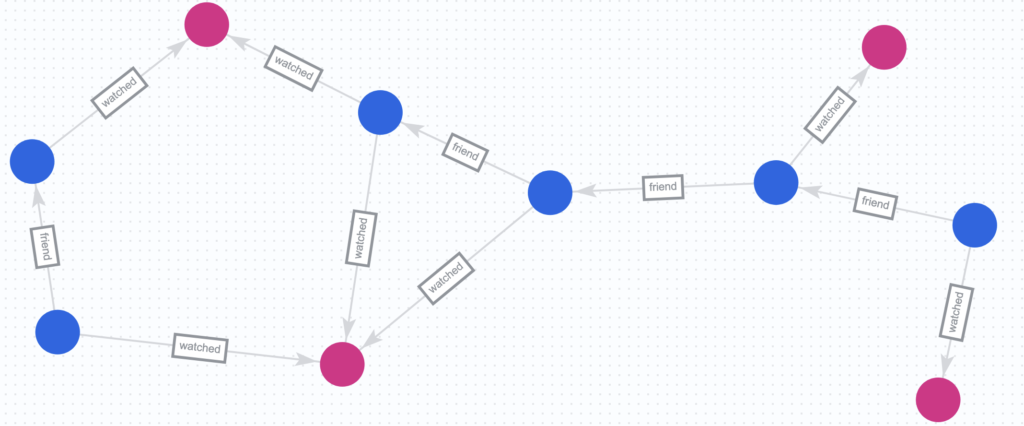
Now let’s use GQL to query the graph to get all Movie Recommendations for each Account based on what the the 1st and the 2nd Degree connections watched.
GRAPH graph_db.streaming_network_graph
MATCH ALL (based_on:account)-[:friend]-{0,2}(recommend_to:account)-[:watched]-(movie_b:movie)
, (based_on)-[:watched]->(movie_a)
FILTER movie_a <> movie_b and based_on <> recommend_to
RETURN distinct recommend_to.account_name as recommend_to
  , based_on.account_name as based_on
  , STRING_AGG(distinct movie_a.movie_name) as recommended_movies
group by recommend_to, based_on;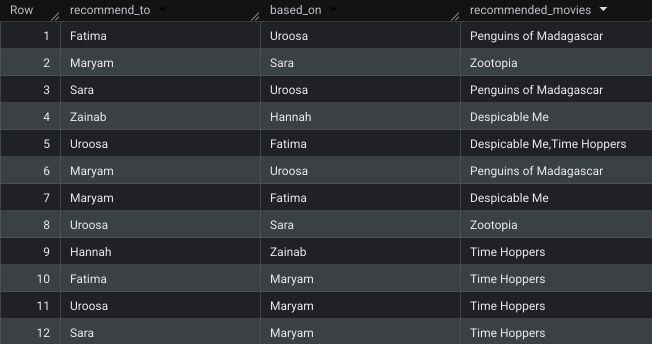
Leave a Reply